

Classes & combat
Combat
Attacks and combos, skills and cooldowns, your class gauge, Soul Burst, creature tells, the target lock, and what happens when you fall.
Fights in Lumenfall are quick, loud and readable. Every hit throws a burst of light and a stack of numbers, and every creature that can hurt you shows you first.
Attacking
Press ATTACK to swing. Press it again inside the swing window and your hits chain: swing, swing, then a heavier finisher. Every third swing is a finisher, with weight to match. Each weapon has its own chain, so a spear, a bow and a pair of star gauntlets all feel different.
Every hit rolls between a low and a high number. Your Mastery raises the low end, so your weakest hits get closer to your best. A critical hit does extra damage and shows a bigger number. With the default damage look, pink marks critical hits, warm gold and orange mark your other hits, and green marks healing. Your Character window shows the numbers for you. See Stats and Ability Points.
Combo counter
Land hit after hit and a gold COMBO counter climbs beside the action. It shows from your second hit, and a blade under it drains over three seconds. Hit again before it runs out to keep the streak alive.
At 10, 25, 50 and 100 hits a word slams onto the screen: GOOD!, GREAT!, SAVAGE! and LEGENDARY!
Defeat several creatures in quick succession and a KO call joins in: DOUBLE KO!, TRIPLE KO!, QUAD KO!, RAMPAGE! at five and LUMENFALL! at eight.
Skills
Skills hit harder than your swing, hit more of the screen, or do something else. Each lives on a key. They have an MP cost and a cooldown, and a key lights up when its skill is ready.
- Your main skill and the Wanderer's Spark Toss share a short 0.7 second cooldown, so you can use them almost constantly.
- Every skill with a cooldown hits clearly harder than your job's main skill, so a skill you wait for is always worth pressing. A later job never teaches a weaker main or ultimate.
- Longer skills take several seconds to return. Tap them for control, healing, buffs or a big burst. A skill card shows its cooldown, MP cost and what it does.
- Skills sort into three lanes: Attacks, Support (buffs, auras, heals, summons, moves) and Passives, which are always on. See Skills and Skill Points.
- The Wanderer starts with Spark Toss, a spark that flies at the first foe. It is perfect for things out of reach. At level 7 you add Glimmer Rain, a patter of pebbles on foes ahead.
Every job advancement makes your ATTACK stronger: more hits, more foes at once and your class's own magic in every swing.
Your class gauge
Beside your portrait, your class gauge fills with every hit that lands, and each point of it gives a small bonus while it burns. Some skills spend the gauge for a bigger effect, and the skill card says which. A skill with a fixed gauge cost needs that many points. A skill that spends the whole gauge can still be used when it is empty, but gets no bonus from spending it. Each class also has an extra way to fill it faster. All of it is in Classes and Jobs.
Souls and Soul Burst
From level 10 you can wear a soul, a spirit taken from a creature. A worn soul gives stats, and it also fills the Soul Gauge.
- Hitting with a skill and defeating creatures fill it. Bosses fill it twice as fast.
- When it is full, press SOUL for a Soul Burst: the spirit of your soul appears and strikes. You cannot be hurt while it plays.
- If a party member on the same map bursts within three seconds of you, the second burst is a Soul Link, and it hits harder and gives some gauge back.
Knockback
Strong blows push creatures back, and some skills launch them into the air so you can hit them again. Creatures can push you too. When a blow hits you, you fly back a little and are safe for a brief moment, so you can get your feet under you. Touching a creature's body hurts but does not push you.
Once you outgrow a creature, it can no longer push you. You stand steady: its hits still deal damage, but you keep your footing, your rope and your attack.
- A creature 20 or more levels below you can never knock you back. This includes bosses and Elites.
- Defence steadies you sooner against ordinary creatures. The more Defence you have, the closer to your level they can be, down to 5 levels below you. Stars on your armour help a lot. Bosses, Elites and the Crowned only yield to the level gap.
- Creatures near your level always push, whatever you wear.
Your Character window shows how far it reaches: Steady ≤ Lv 100, for example. See Stats and Ability Points.
Hit a monster in the air for AIR!, then slam it down. See Combat: air and slams.
Reading creature tells
Every creature attack winds up with a clear sign before it lands: a crouch, a glow that charges, or a shape that appears on the ground. Read the sign, then move.
- Jump the shockwaves that sweep along the floor.
- Step out of a marked area on the ground before it lands.
- Boss bars show the boss's health, and under them a thinner bar that fills as you hold a boss with stuns and freezes. See Status Effects.
The prologue teaches this with the 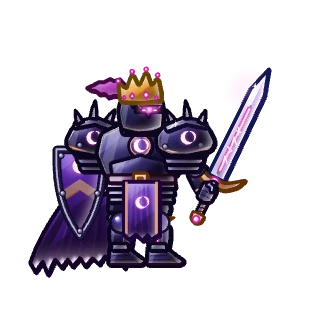 Gloam Herald: when its blade falls, jump the wave, then strike back.
Target lock
Hit a boss and it locks on its own: a map, lair, dungeon, raid or Party Quest boss, or a Crowned giant. Its bar shows a gold padlock and LOCKED, and on a phone a ring sits under it. Creatures and other bosses you hit later never take the lock.
- Tap a creature to lock it.
- Tap the boss bar to lock that boss, and tap again to unlock. Your hits will not lock it again until you tap it or its bar.
- The lock ends when the target dies or stays out of range for about 8 seconds. A knock-back or a dash away does not end it.
Your target frame keeps showing the locked target. With no left or right held, an attack skill turns your hero toward it when it is within the skill's reach, as ATTACK does. Hold left or right and you steer instead. AUTO uses the lock too: see  AUTO-Hunting.
Falling
When your HP reaches zero you fall. The fall screen shows who defeated you and the damage you took in the last few seconds, so you can learn from it.
- In the world you lose a small amount of EXP, about 5% of what your current level needs. You never lose a level and never lose an item.
- You return to your last town after a moment.
- Revive here lets you get up where you fell. A limited number of these are available each day.
- In a Proving Ground, falling fails the trial and costs no EXP.
 Tips
Read next
Combat: air and slamsHit monsters in the air, slam them down, break an Elite's guard, and follow the glowing key.Classes and JobsThe five classes, their two paths each, the four advancements, and how to try every class before you choose.Skills and Skill PointsThe skill tree, how Skill Points are earned per job, ranks, prerequisites, permanent EFFECT picks, buffs and buff macros.Status EffectsStun, freeze, bind, confuse, slow, burn, poison, blind and weaken. What each does to you and to creatures, and how bosses break.Stats and Ability PointsSTR, DEX, INT and LUK, what each class wants, how AP and AUTO assign work, and every other number on your Character window.AUTO-HuntingLet your hero hunt for you. How AUTO picks targets and fights bosses, what it uses, how its time works, how to save battery and how auto-quest differs.